AAnamorphicFit
The front page

What it does

Everything your studio app does

The slides at a glance, what you won't find anywhere else, everything else already built, the shapes a week can take — and what's being built next.

At a glance

Everything your studio needs, a slide at a time

From the day your site is handed to you to the hundredth class. Swipe, use the arrows, or tap one to see it full screen.

  1. Day one

    Your own app, already running

    Your site, its database and its hosting are set up and handed to you — backed up every day.

  2. Getting started

    Set up a screen at a time

    Your name, your photo, your first programme — a few questions each, and you see it change as you go.

  3. Every morning

    Today, and what needs you

    Today's classes with Class mode, then whatever waits on you — the first thing your studio shows.

  4. Live classes

    Zoom, connected once

    Paste your keys, guided screen by screen. Every class then makes its own meeting.

  5. Video hosting

    Video at cost, not at a markup

    Your own video account, paid only as it's used — or start on one set up for you.

  6. No surprises

    Your video bill, before it comes

    Put in your members, minutes and picture quality — and see what each host would charge, side by side.

  7. Rupees

    Paid by UPI or card, straight to you

    Through your own Razorpay account. No revenue share, and a receipt for every payment.

  8. DollarsArriving soon

    Students abroad pay by PayPal

    Dollars go to your own PayPal account, matched to a pass the moment they land.

  9. One programme

    A price in ₹ and a price in $

    Each your own figure, never converted. Members see both, and pay in theirs.

  10. Your timetable

    Programs, batches and classes

    The 7 am and the evening batch of one program — each a page of its own, its classes inside.

  11. One room

    One meeting link for a batch

    Meet in a room of your own? Paste its link once, and every class of the batch has it.

  12. Your timetable

    The week at a glance, any week

    Every class Monday to Sunday, what clashes ringed in red — and any week, near or far, from a calendar.

  13. Plan ahead

    Two weeks of class plans, one page

    Write what each class will be. Members read it before they come.

  14. Your group

    Post the class on WhatsApp

    Every message carries the class's own link — and only a pass gets through it.

  15. On the laptop

    Send it from your phone

    Every WhatsApp button shows a code: your phone opens WhatsApp with the message ready.

  16. One note to all

    Message a program, or some classes

    Everybody with a pass, or everybody coming to the classes you chose — to your group, or by email.

  17. Class time

    Start the class in one tap

    Start online class opens Zoom as the host. No link to hunt for.

  18. Hybrid

    In the room and online, one class

    A studio class streamed too: one pass opens either door, and they choose each morning.

  19. For members

    Join opens 15 minutes before

    Members get a Join button, never the meeting's link, from a quarter of an hour ahead.

  20. In their calendar

    Classes in their own calendar

    Subscribed once, a member's classes sit in their phone's calendar — with a reminder, kept up to date.

  21. Protected

    A new meeting for every class

    A link passed around works for one class, and is dead by the next morning.

  22. After class

    Recordings arrive by themselves

    Zoom's recording lands on its class, waiting for you to publish it to the people who were there.

  23. Every class, remembered

    How it went: photos and a few words

    Photos, a video and your notes on each class — for the people who came, or for everybody.

  24. Your money

    Every payment in one place

    Online and cash, refunds, numbered receipts and GST invoices — and the month as a spreadsheet.

  25. Kaizen

    Members watch themselves improve

    A calendar of the classes they came to, weeks in a row, and stickers from their teacher.

  26. Kaizen

    Badges they earn by showing up

    10 classes, 8 weeks in a row, 30 days of a habit — in your colours, on their progress page.

  27. Kaizen

    Daily habits, and friendly races

    Pursuits to tick off each day, and challenges with a leaderboard for whoever joins.

  28. Kaizen

    Who to cheer, who to call

    Milestones reached this week, and regulars who stopped — a we-missed-you ready to send.

  29. Grow

    Teach once, sell for years

    Recorded courses are Buy now: they pay and start lesson one in the same minute.

  30. Sell it well

    A page for each program

    Photos and videos, questions answered, who teaches it and its price — on its own page.

  31. Lessons

    A word between the parts

    A lesson stops where you choose, says what comes next and what to get ready, then carries on.

  32. New

    Record or upload, decide later

    Film in the app, or upload what's on your phone. It goes to your video account; decide later where.

  33. Your library

    Every video and photo in one place

    What each is used for, what nobody watches, and what can go — before your bill notices.

  34. Joining

    Asking to join, answered in one press

    They say how they paid, with a photo of the receipt. You press Let them in.

  35. Your terms

    Terms agreed at sign-in, on record

    Your terms, privacy and pricing policies, accepted once by each member and kept with the words they saw.

  36. Booking

    Packs, places and booking

    Sell twelve classes or every class. Members book, and the room never overfills.

  37. Regulars

    Their usual class, booked once

    Book every 7:00 am class in one press — any full ones skipped and named.

  38. Every month

    Next month in two presses

    Run it again, then Carry on: everybody comes along, paid ahead or paying later.

  39. Pay later

    Let them in now, paid later

    A week's grace from their first class: they tap I've paid, and you mark it paid when it arrives.

  40. Keep them coming

    Passes running out, reminded

    Whose pass ends this fortnight, each with a reminder written for you to send.

  41. In the room

    Class mode: just the class

    Who's booked, who's here, praise and the door — and nothing else on the screen.

  42. At the studio

    Who's booked, at the door

    The door list says who is coming and who is here — and lets in somebody new on the spot.

  43. At the door

    Keep in mind: a knee, a goal

    A few words under somebody's name on every class's list — and on their own account.

  44. Who's who

    Everybody by their face

    Each person's photo or initials beside their name; your own at the top opens Light, Dark and Sign out.

  45. At the door

    Scan their pass, see it's them

    Each pass is a code that changes every half minute. Green, they're in; red, help them there.

  46. Your team

    Teachers see only their classes

    They sign in with Google. Add a manager, or a deputy who runs it all for you.

  47. Paying your team

    Classes taught, by person

    How many classes each person taught this month and last, and for how long — covers included.

  48. Paperwork

    Contracts with your staff, in one place

    Drawn up from templates, printed for signing, and frozen once signed.

  49. Moving across

    Bring your members with you

    Give each a pass by email; the first time they sign in with that address, it's theirs.

  50. No Google? Fine

    A link of their own

    Sent once on WhatsApp, it opens their classes and nothing else.

  51. For members

    Their passes and receipts, on hand

    Each member's Account: their passes, what they paid, and every receipt to download.

  52. On their phone

    An app with your icon

    Members install it from your site. No app store, no review, no waiting.

  53. Opening the app

    Your photo, the moment it opens

    The installed app opens on your photo, icon and name — never a blank screen.

  54. On WhatsApp

    Your link arrives with your picture

    Share your site or a class, and it shows your photo, icon and name before anybody taps.

  55. Your look

    Your name, your colours, your front page

    Change any of it from Look and feel, any day, and see where each part sits. No developer needed.

  56. In their words

    Your students' words on your front page

    Members write a few lines from their dashboard; nothing shows until you approve it.

  57. News

    A sale or a workshop, announced

    A line across every page, or a promotion that pops up once — each with its own last day.

  58. Reach you

    A Contact page, set in a minute

    Phone with WhatsApp, address with Google Maps, hours and your socials.

  59. Help, on your terms

    Support gets in only while you let them

    And every page they change is listed for you.

  60. Never locked out

    A second owner, for peace of mind

    A partner, or a second Google account of yours, owns it too — so nobody is ever locked out.

  61. Lost? Type it

    Every setting, a few letters away

    Press Ctrl K and type what you want — a price, a person, a class — and land right on it.

  62. Find your way

    Your whole studio on one page

    Every part of the menu, what it's for and what's inside it, a tap away.

  63. It's yours

    Download everything, any time

    The whole database as a zip — to keep, or to take elsewhere.

1 of 63

What you will not find anywhere else

Built for how a studio is actually run — cash at the door, a laptop streaming from the corner, a teacher covering on Saturday. Every picture here is the app itself, from the demo studio.

Paid online, or however they pay

Paid on your own site — and nobody is forced through a checkout

A recorded course is Buy now: they pay on its page — UPI, card, whatever your Razorpay account takes — and start the first lesson in the same minute. Live classes ask first: you say yes, and Invite to pay. And cash after class still works: they say how they paid, with a photo of the receipt, and you press Let them in.
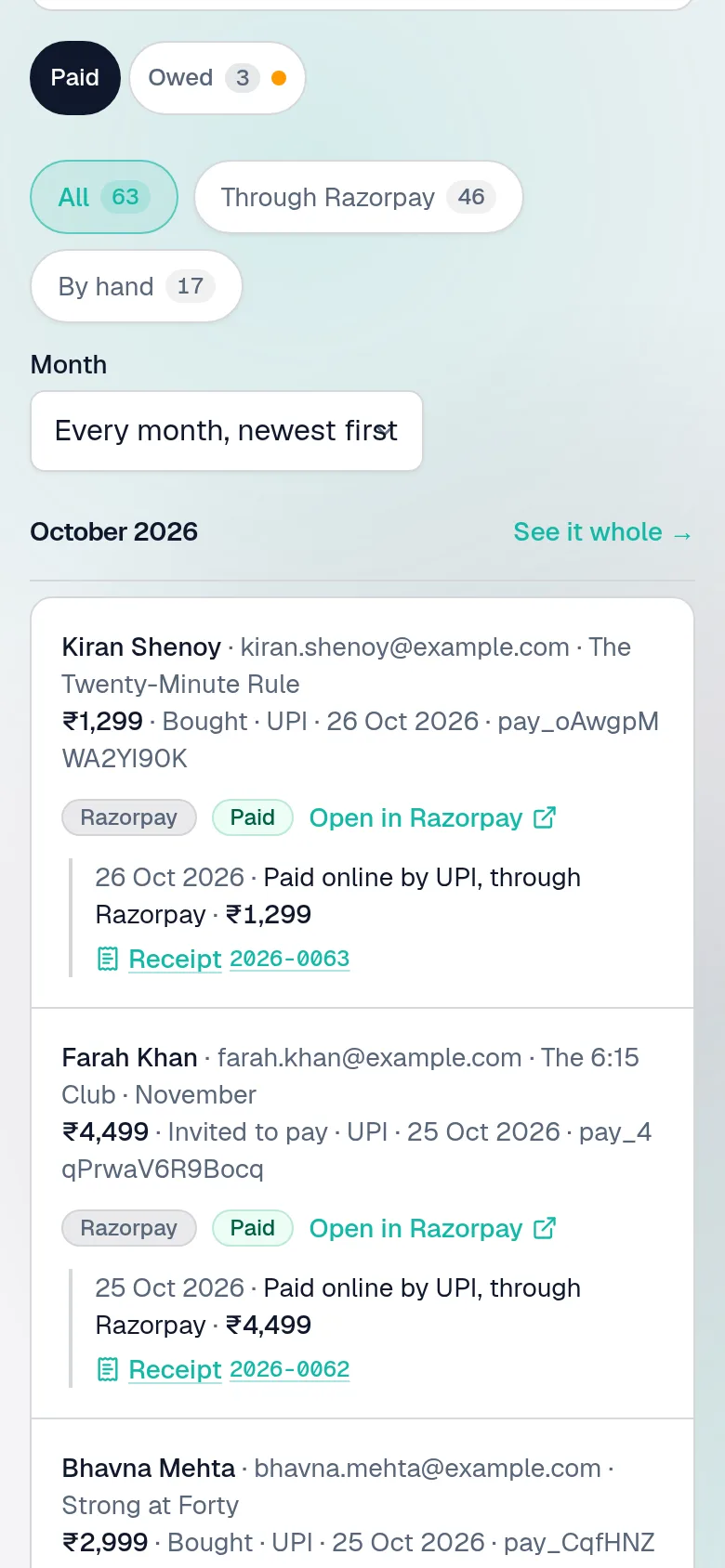
  • Through your own Razorpay — straight to your account, no revenue share
  • Numbered receipts, GST invoices if you're registered, any month downloaded for your accountant
  • A refund made in Razorpay takes the pass back by itself
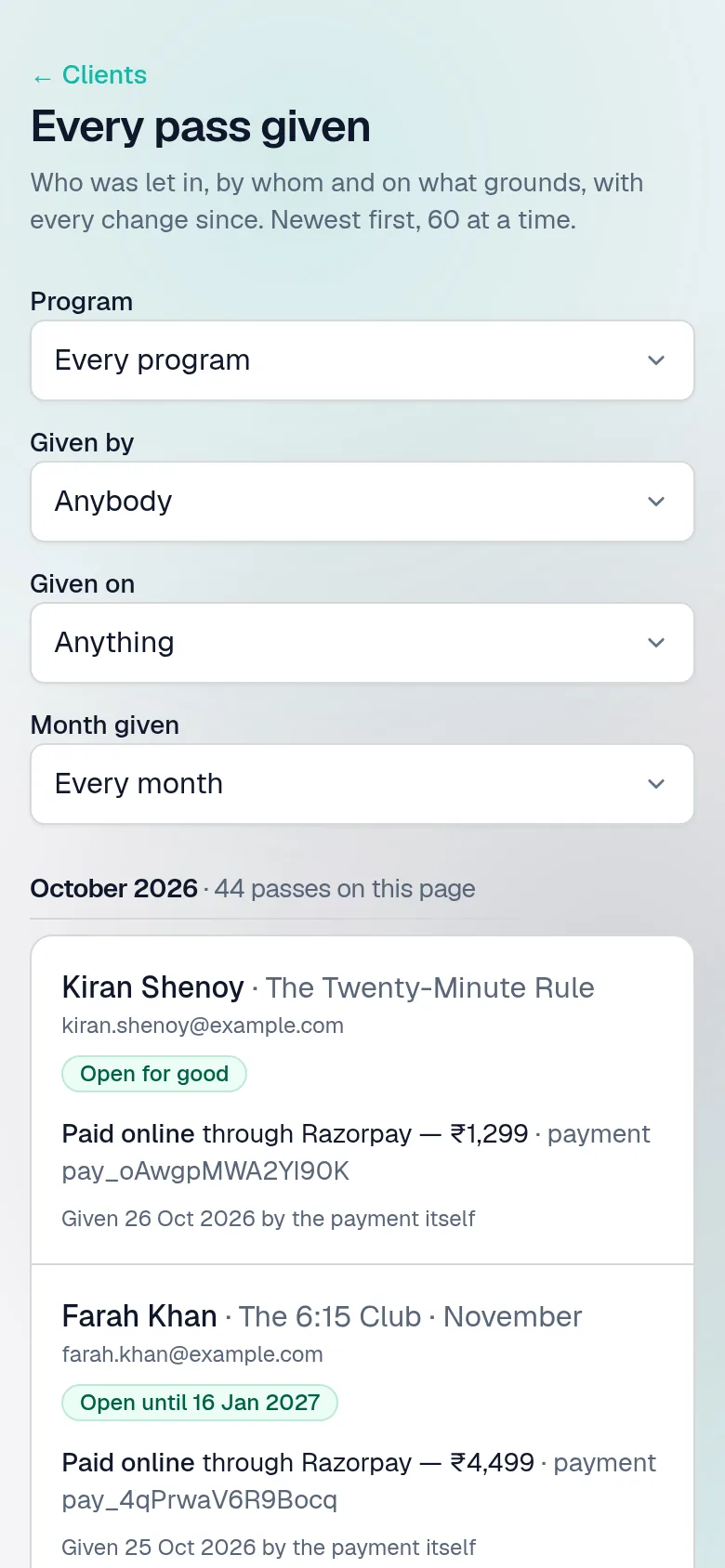
  • Every pass keeps what it was given on, and who gave it
Payments: every sum taken, each with how it was paid, the member's own words, and a numbered receipt.
Every pass given, each with what it was given on — a receipt, cash after class, a scholarship.

Bring your studio as it is

Your regulars come with you — Google account or not

Already teaching, with people who pay you by cash or UPI and a Zoom link you send every morning? Give each of them their pass with what they've paid, in a minute a person. Whoever won't sign in with Google gets a link of their own, sent once from your WhatsApp: it opens their classes and Join, and stops when their pass does. Nobody needs the meeting's own link again.
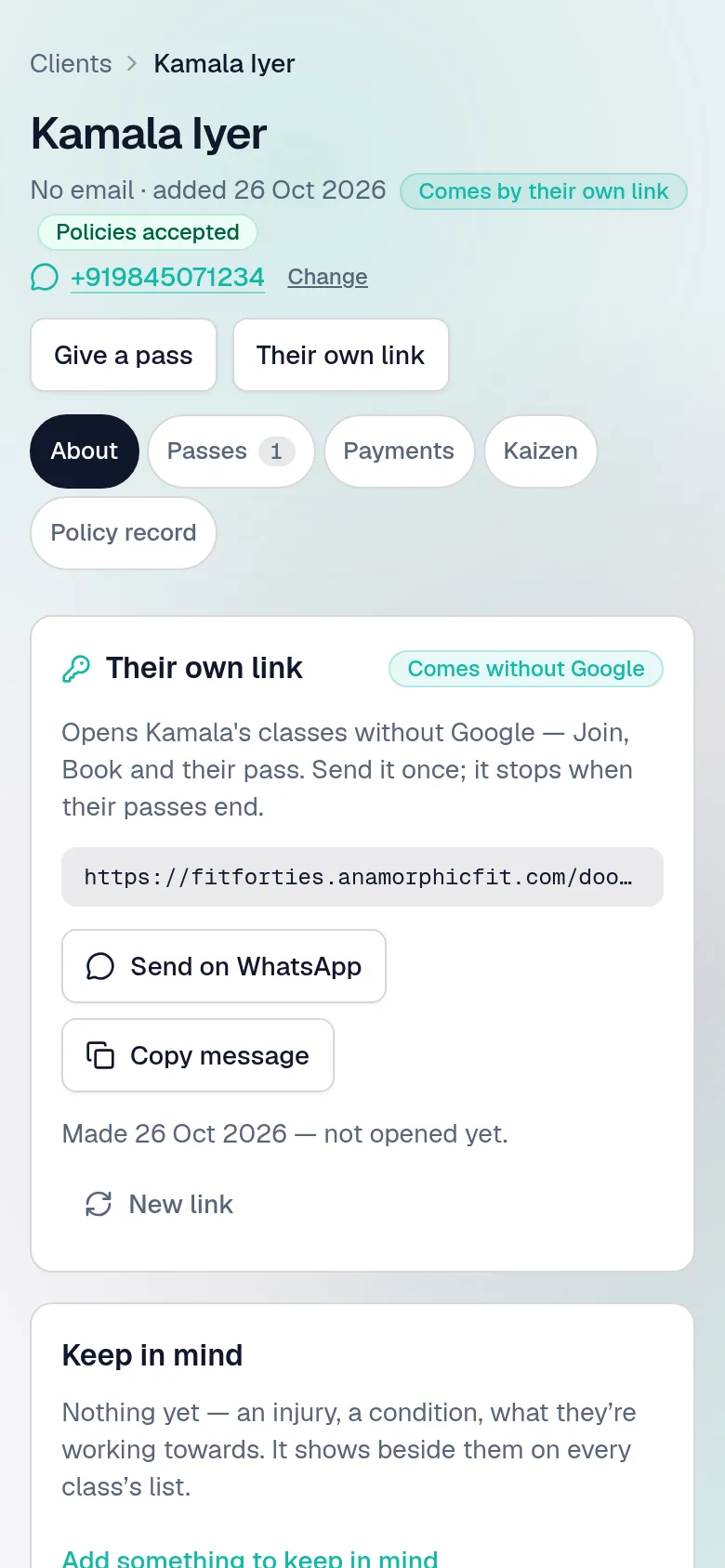
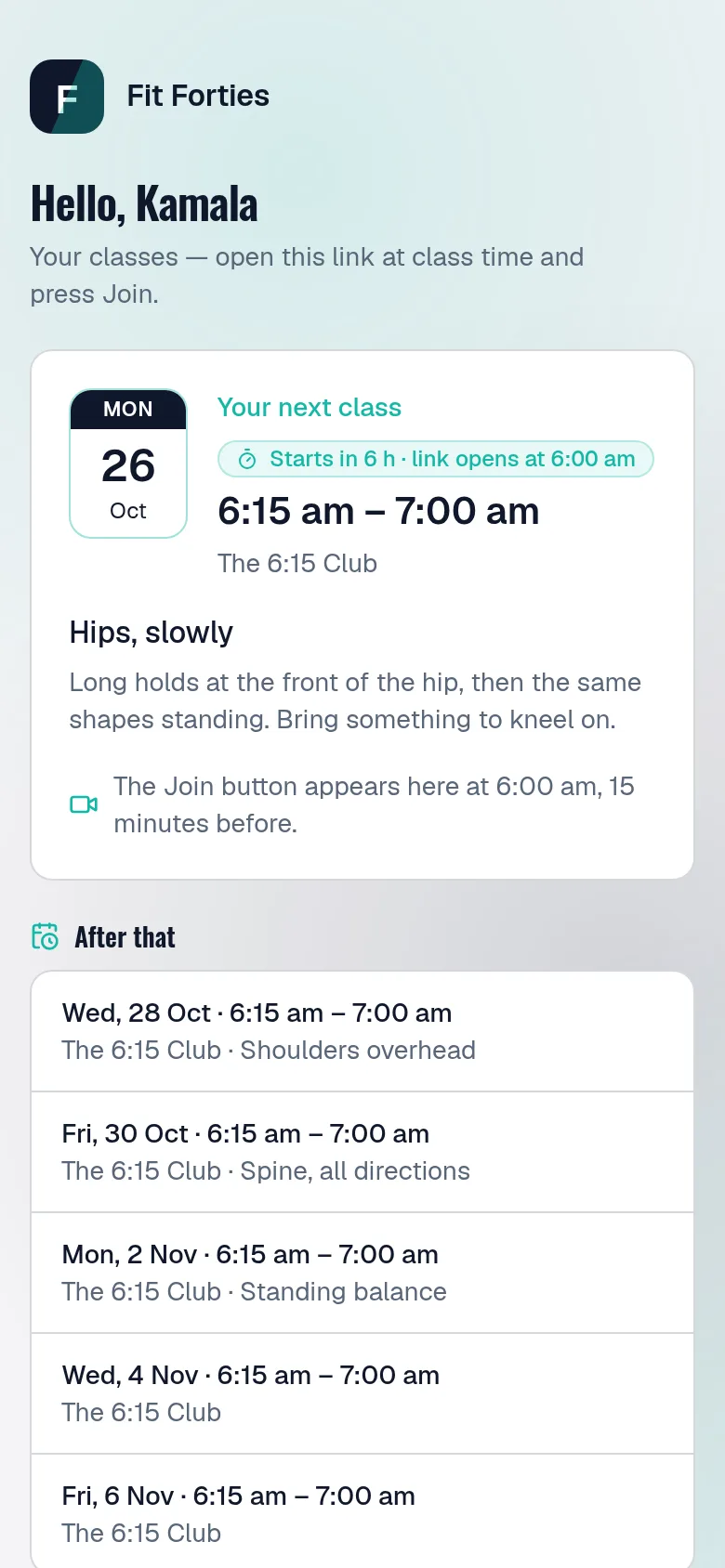
  • Their own link: no account, no password, no Google
  • It says whether they've opened it, and New link ends a shared one
  • If they sign in with Google later, their passes come with them
A member added without Google, on the owner's phone: her name marked Comes by their own link, and Their own link — what it opens, Send on WhatsApp with the words written, whether she has opened it, and New link.
A member's own link, opened on her phone with no sign-in: hello by name, her next class with what it covers and when its Join button appears, the classes after it, and her pass.

In the room and from home

One class, sold the ways people actually come

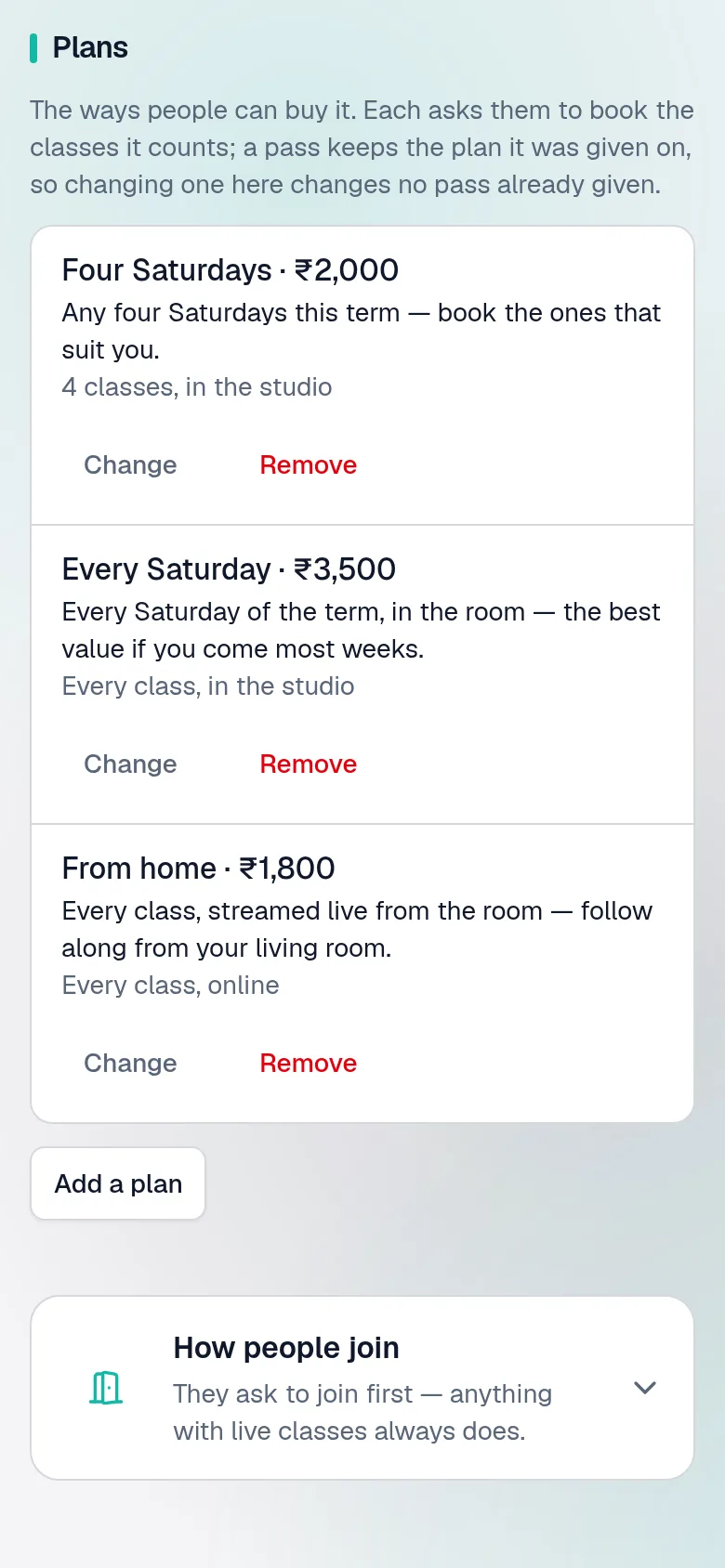
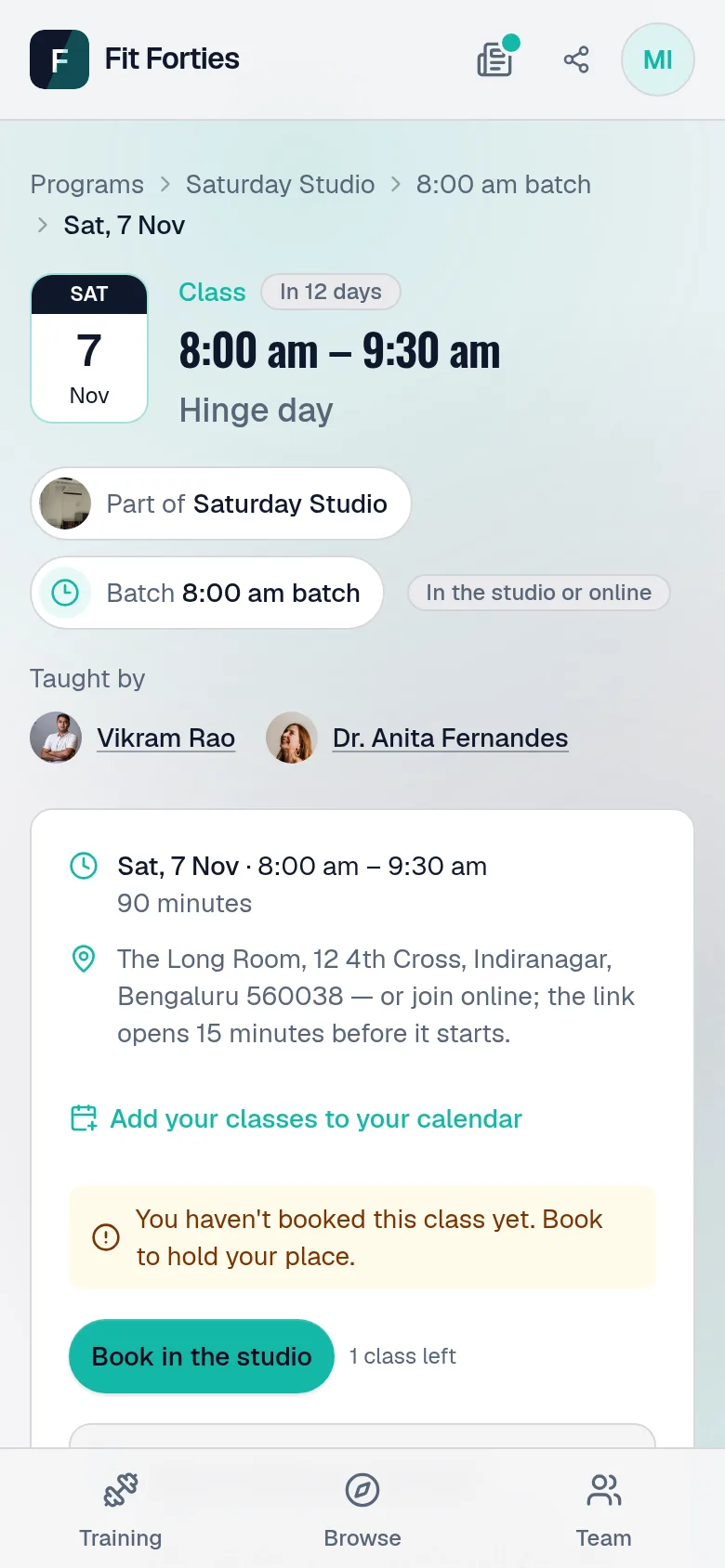
Four Saturdays, every Saturday, or every Saturday from home for less — each a plan with its own price, on the same programme. Members book the classes their plan counts, see how many they have left, and cancel in time to get one back.
  • Places counted for the room and for online, separately
  • A box for every class on their dashboard: used, booked, left
  • Buy another, the moment the last one is booked
A programme's Price tab: three plans — four Saturdays, every Saturday, and from home — each with its price.
A class page for a member: its date and what it covers, a line saying she has not booked it yet, and Book, with one class left on her plan.

A timetable that runs itself

Say when you teach once, and every class gets a page of its own

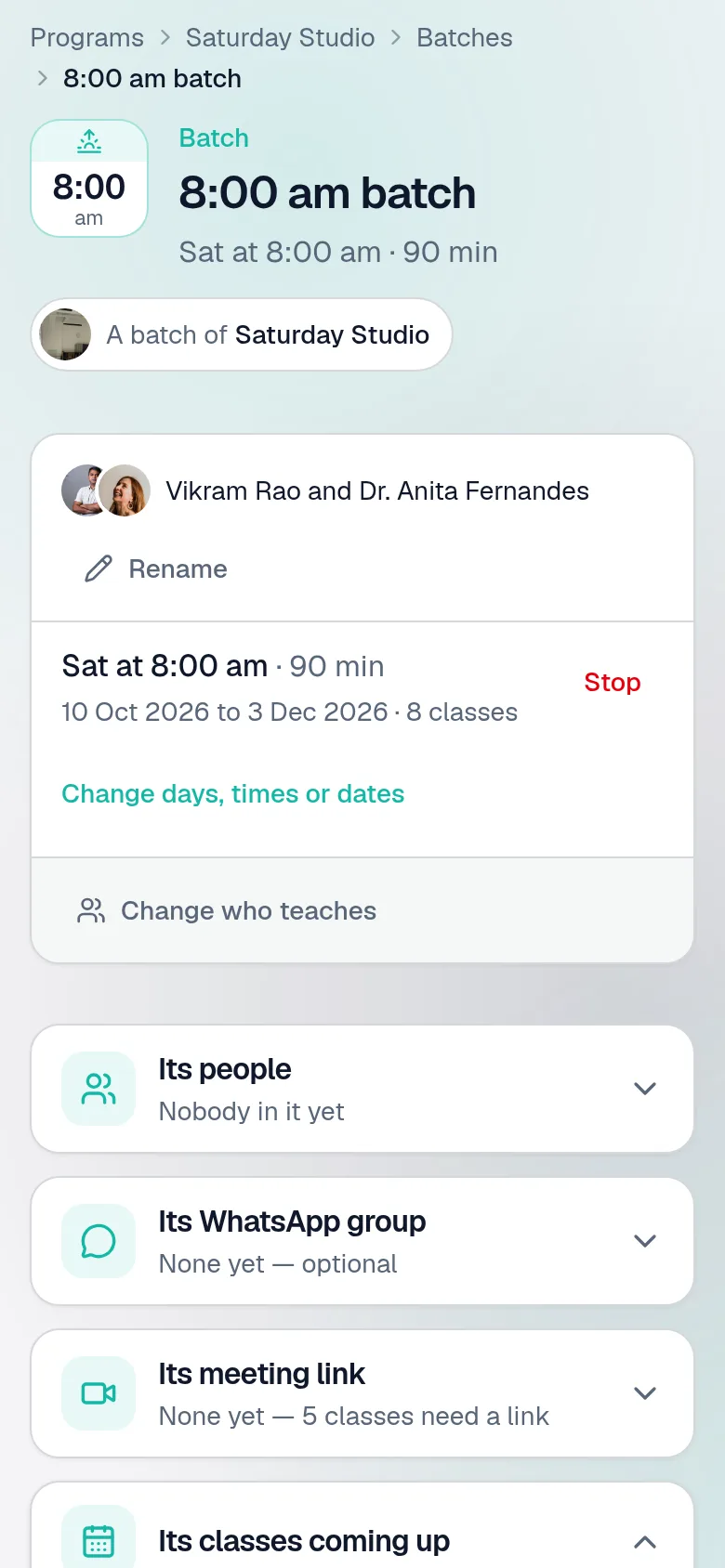
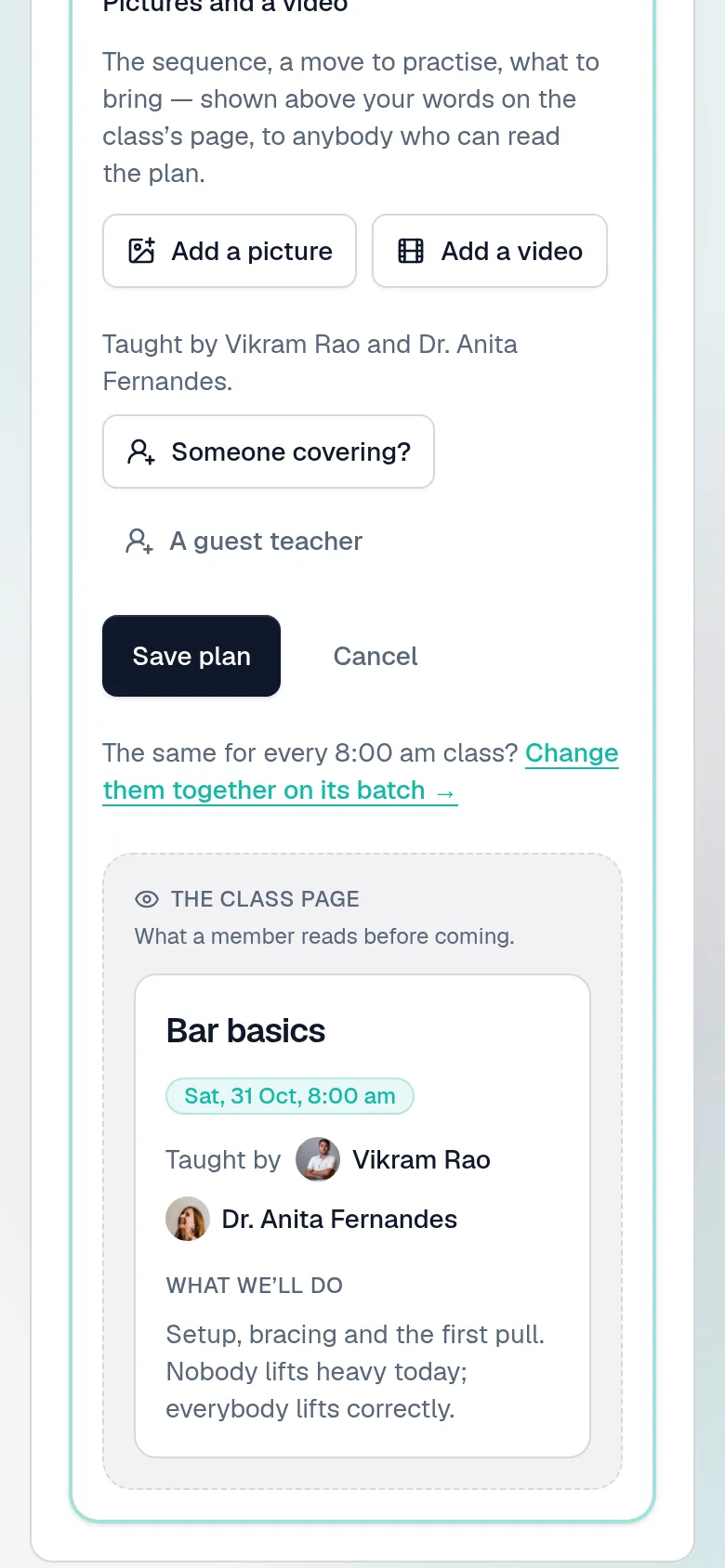
A programme is its batches — the 6:15 am, the evening, the weekend — each with its own people, its teacher and its WhatsApp group, and a page of its own. Each batch makes its classes, and each class has its own page: who has booked, a door list, and a plan — written for that class, or on its batch for all of them.
  • Programme, batch, class: always clear which one you're looking at
  • Connect Zoom and each class gets a meeting of its own
  • Call one off, and the page offers you the message to send
A batch's own page: its time on a tile, the programme it belongs to, who teaches it and its days, its people, its WhatsApp group and its own meeting link, and its classes coming up, changed together.
A class's plan: what it covers and who teaches it, written for this class — and its batch a press away, for every Saturday 8 am class at once.

Help you control

Support is let in, never left in

Whoever set your site up can get into your studio only while you let them: for your first 30 days, then a day, a week or a month at a time, from Settings. A strip on every studio page says so, on both sides.
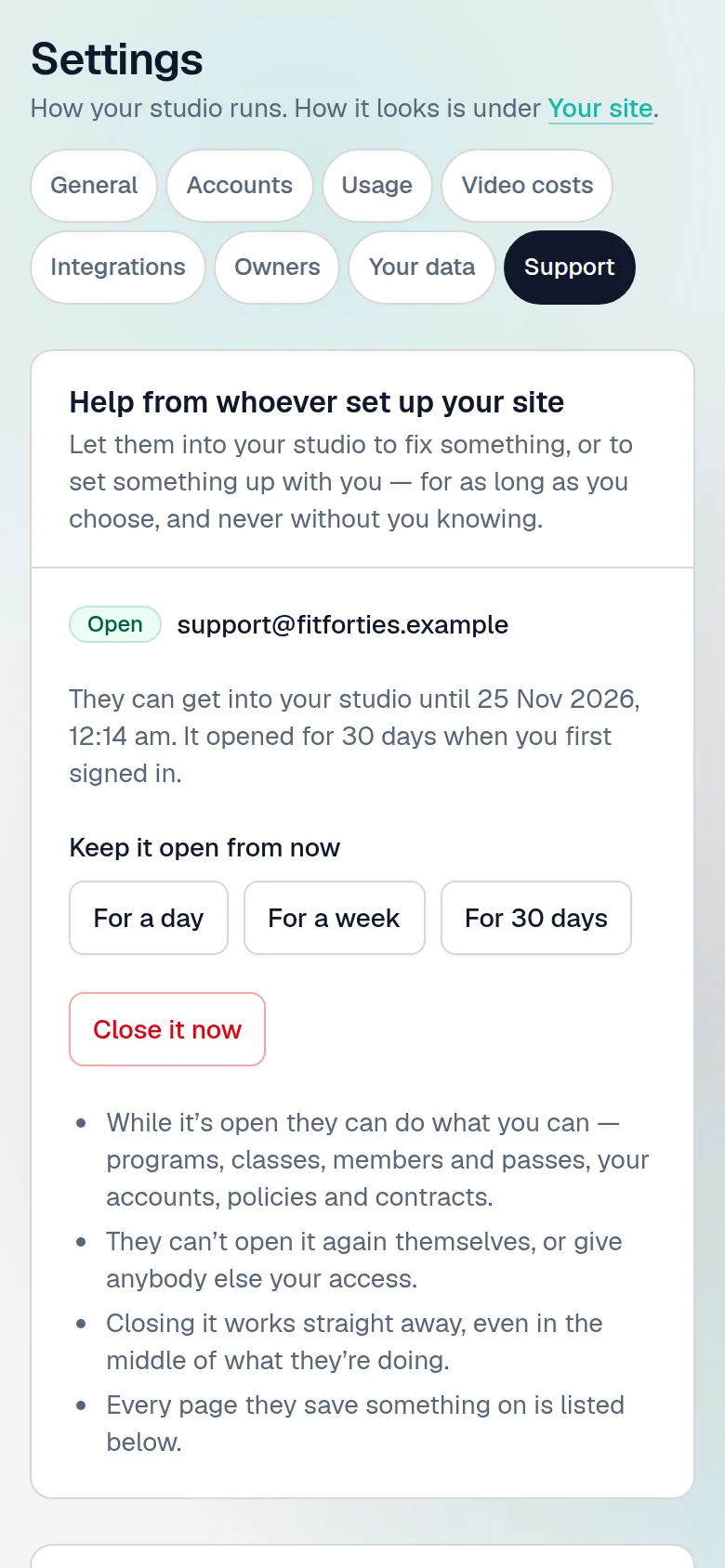
  • They cannot reopen it themselves, or let anybody else in
  • Close it now works at once, even mid-task
  • Every page they saved something on, listed for you by day
Settings, Support: whether whoever set the site up can get in, for how long, and what they changed.
  • A team, without giving away the keys

    Teachers sign in to a studio cut down to the programmes they teach. Choose one to run the studio day to day; prices, passes, contracts and settings stay yours.
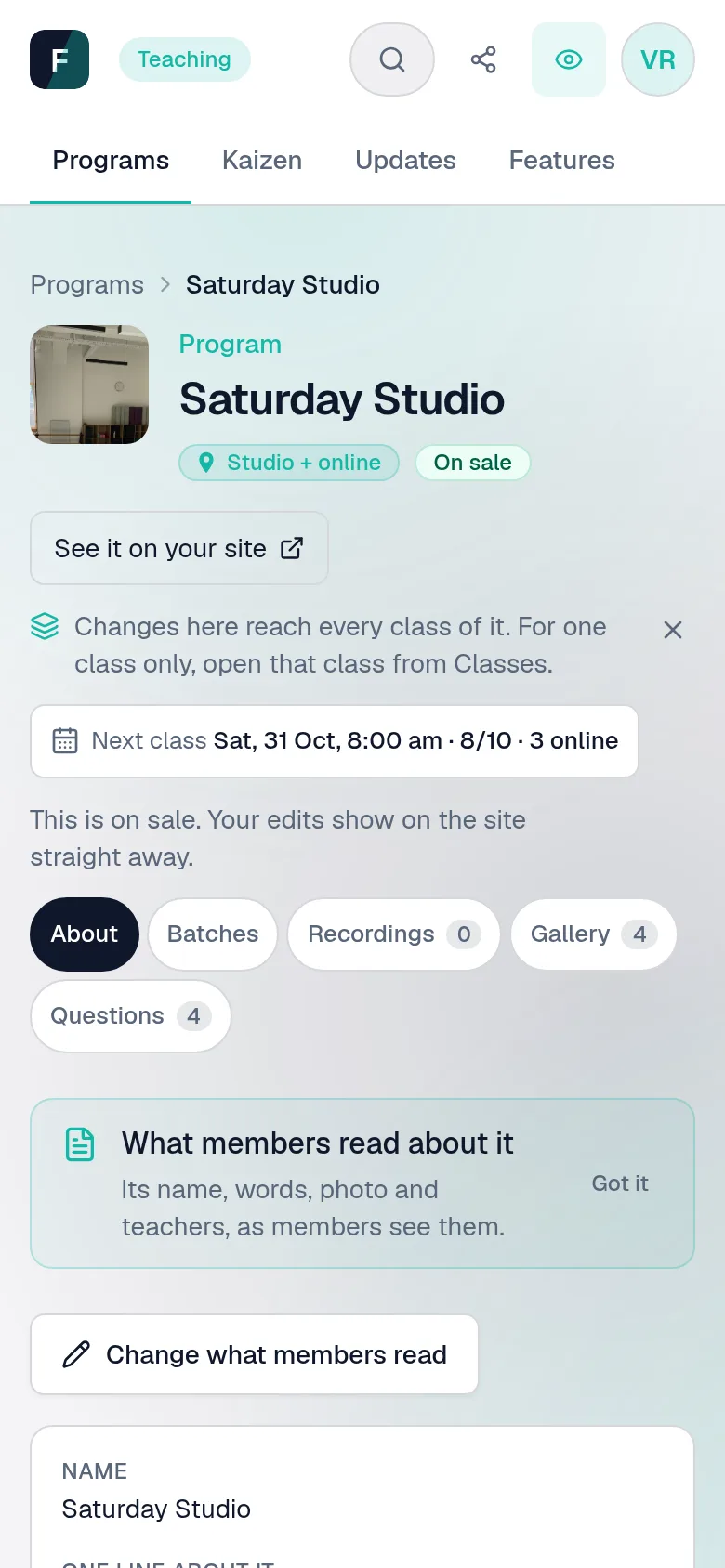
    A teacher's view of a programme they teach: its words, classes, recordings, gallery and questions — no price, no settings.
  • Your video bill, before you choose

    Cloudflare, bunny.net or a quote you were given, side by side — a month at 30, 100, 1,000 and 10,000 members, in rupees or dollars. You pay your video host directly.
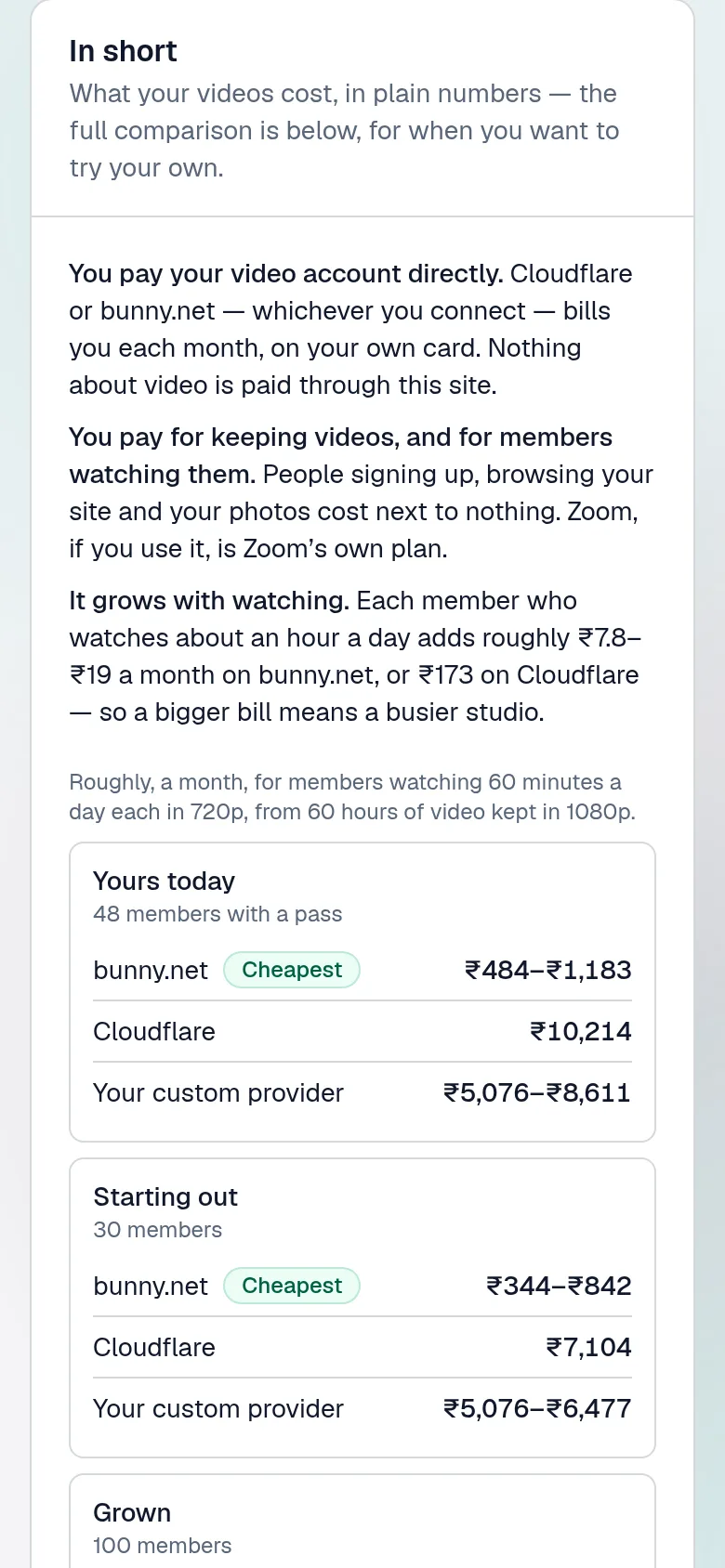
    What video will cost, in short: a month's bill for 30 to 10,000 members on each video host.
  • Paperwork that holds

    Agreements with teachers, guests and anyone hiring the room, drawn up from templates, printed for signing and frozen once signed. Members accept your policies at sign-in, on a record you can print.
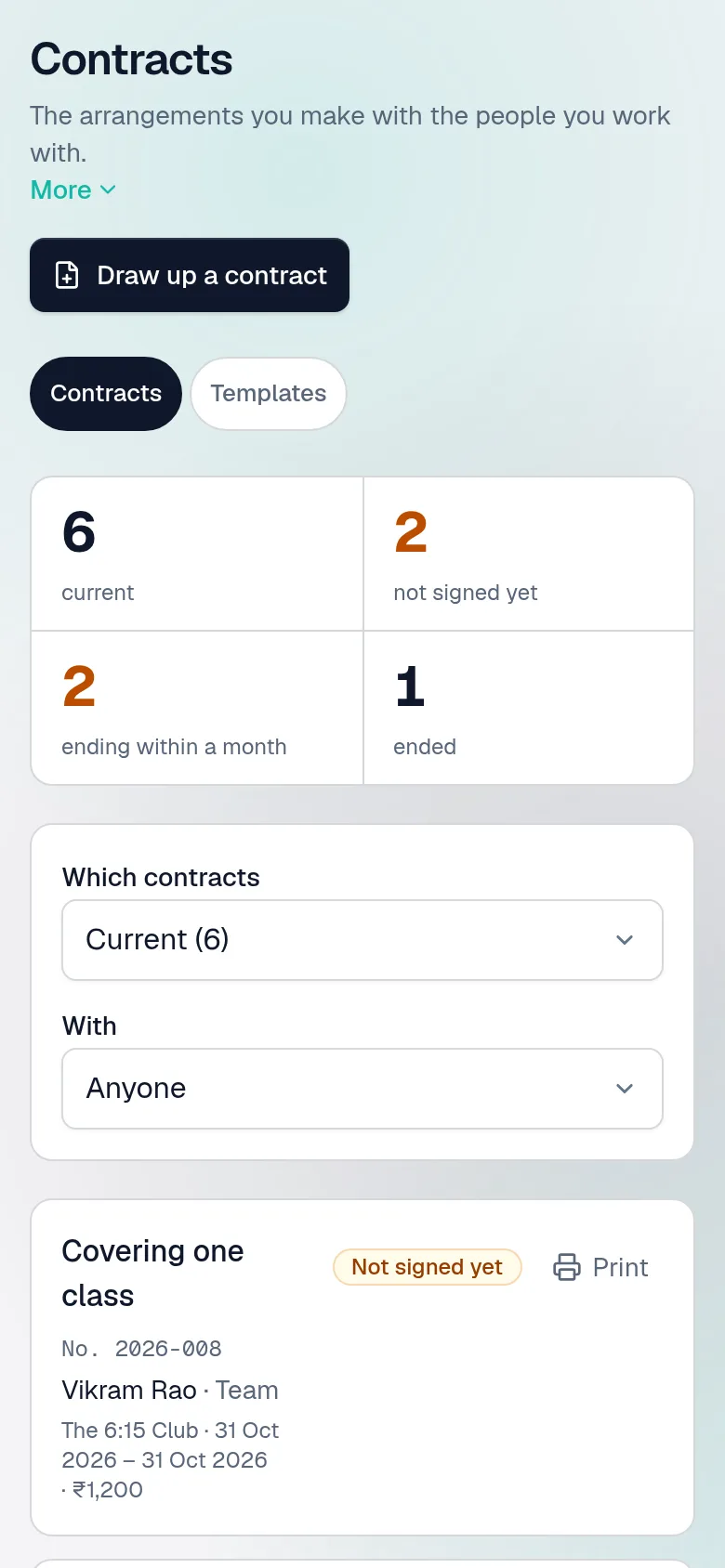
    Contracts in four numbers — current, not signed yet, ending within a month, ended — above the list, each contract numbered with its state.
  • Ask for anything

    Every feature explained in plain words, and a search on every studio page: type “cancel a class” and it takes you to the button.
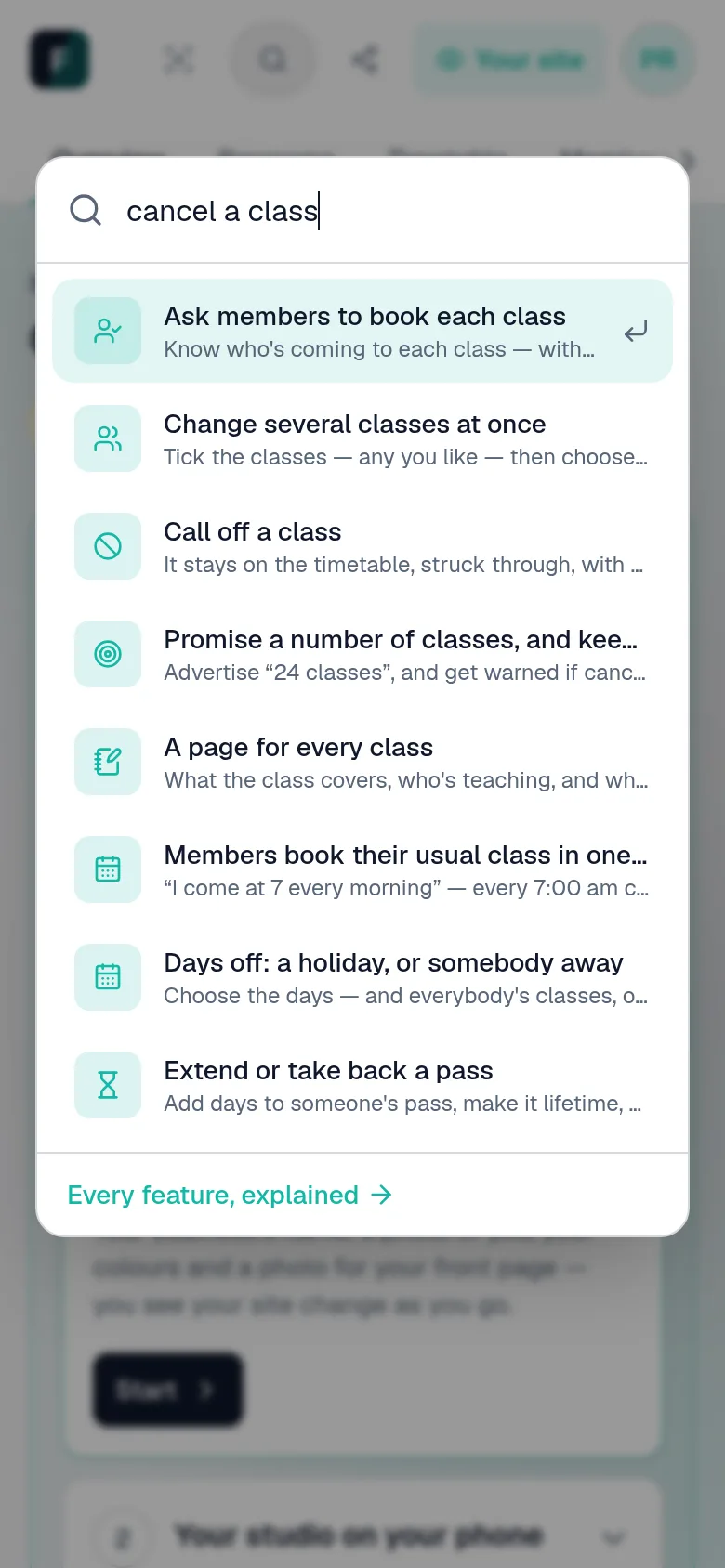
    The studio's search, open over the page, with the steps for cancelling a class among the results.
  • A fortnight's plans in one sitting

    The next two weeks' classes on one page. Write what each is about — starting from last time's — and save them all together.
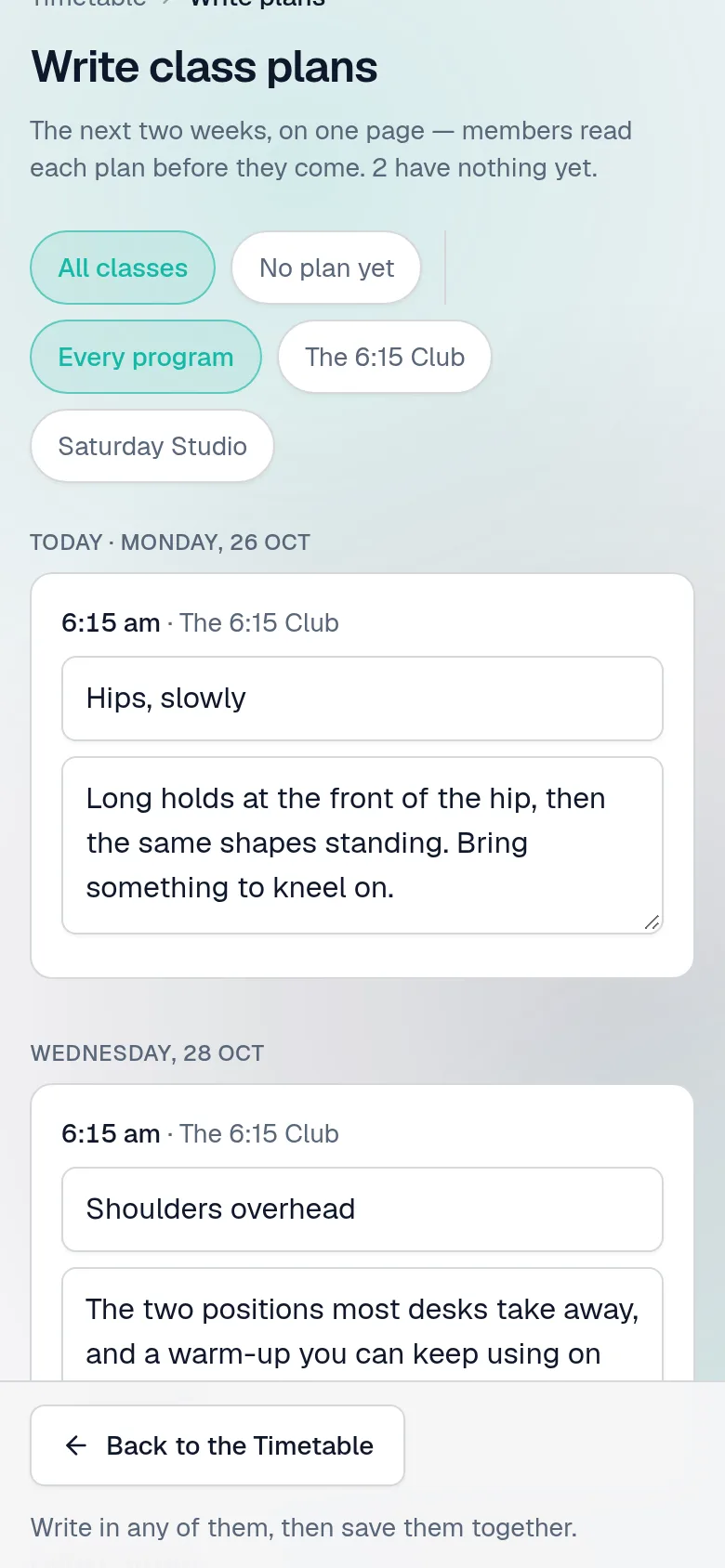
    Write class plans: the next two weeks' classes on one page, each with a title and what it covers, some started from the last class at that time, saved together.
  • One note to everybody

    A class moved, a holiday, a new batch: Message everyone in a programme, or everybody coming to the classes you choose — to your WhatsApp group, or one email to all. On a laptop, a code opens it on your phone.
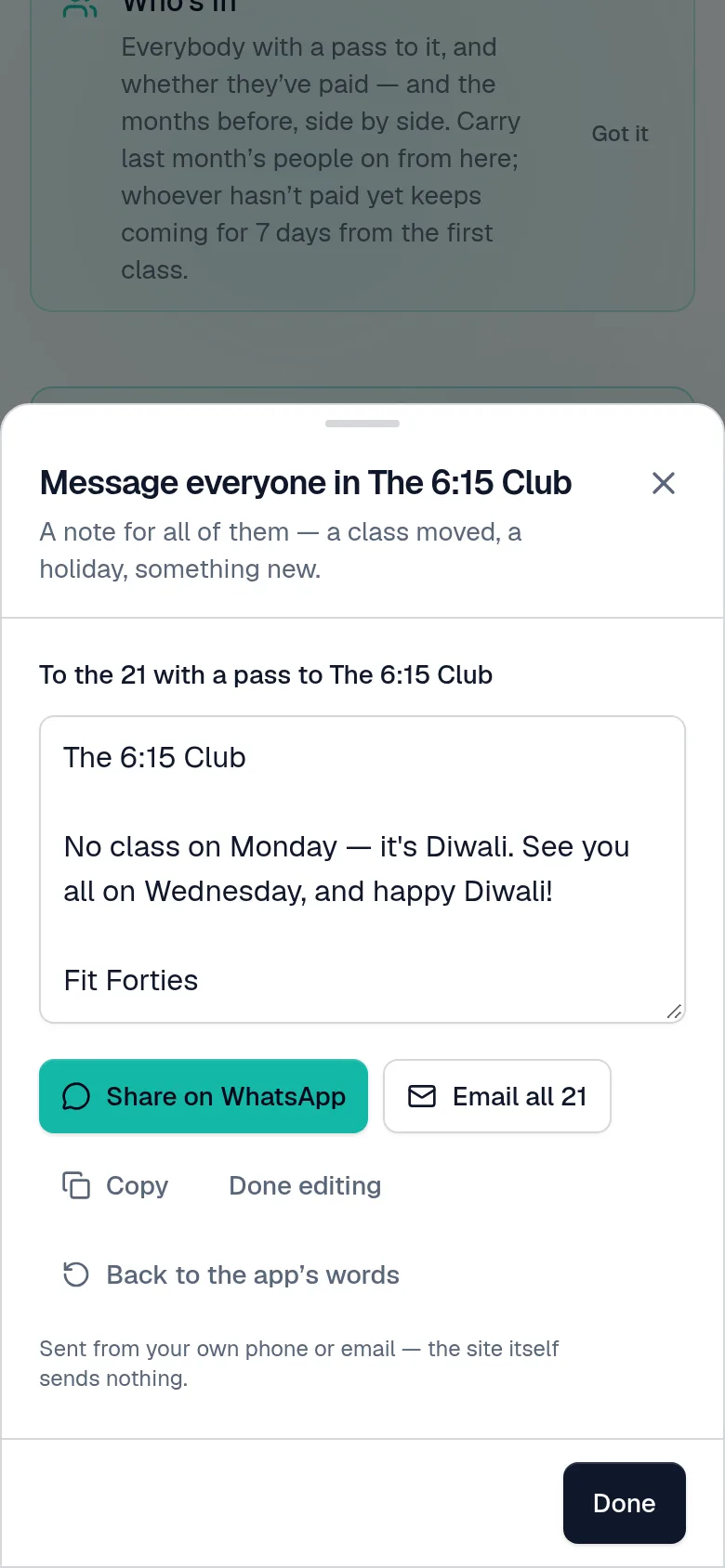
    Message everyone in a programme: a note to the 7 with a pass, ready to share on WhatsApp, open in its group, or email to all.
A week at the studio, screen by screenMonday’s requests, Saturday’s door list, the end of the month — the ordinary jobs, as they look on your phone.See the week

And everything else, already built

Set up for you, finished by you

Your site is made and handed over at your first sign-in. A welcome card then takes you through the rest — your business, your look, your accounts, your first programme — a few simple steps, one at a time.

Video that stays yours

Upload straight from the browser, however long the lesson, to Cloudflare or bunny.net — your account, your bill. Playback runs on short-lived signed links that are useless the moment someone stops watching.

Courses, classes and bundles

Recorded lessons, live classes online, classes in a studio — streamed too, if you like — or several sold together. Terms with a start and an end, and Run it again for next month's batch.

A front page that sells

Your story in photos and words, your team with a page each, a gallery and questions on every programme, and students' feedback — shown only once you approve it.

Every class remembered

After a class, add photos and a few words about how it went, for the people who were there. Keep notes of your own; members keep theirs. Every past class, newest first.

Easy to reach, both ways

A Contact page with your phone, email and where to find you. Members' phone numbers beside their names, a tap from WhatsApp, and Message everyone coming on every class.

Your name on all of it

Your colours, your app icon, your address, and a notice across the top when you need one. No platform badge, no marketplace putting another coach's advert next to yours, no revenue share.

Messages written for you

You're in, your pass is running out, a payment is due, here is your receipt — each written ready to send from your own WhatsApp or mail, in a tap. At the laptop without WhatsApp Web? A code opens it on your phone.

Every video accounted for

Everything on your video account, joined to what uses it — a lesson, a class recording, or nothing at all — with what has never been watched at the top. The upload that failed halfway, found and deleted in a tap.

A pass for somebody not signed up yet

Give a pass to an email address — a gift, a friend who paid you in cash — and it is theirs the moment they first sign in.

Installs like an app

Clients add it to their home screen — the site asks them, at the right moment — and it opens full-screen, with your icon. No app store, no download, no update to chase.

One room, one link

Meet in a Google Meet or Zoom room of your own? Paste its link once on a batch, and every class of it has it — next month's batch too. Members still get in only with a pass.

What to keep in mind

A knee to go easy on, a goal: a few words under somebody's name on every class's list, for whoever teaches them — and on their own account, so it is never said behind their back.

Classes taught, counted

How many classes each person taught this month and last, and for how long — a cover counted for whoever covered — for paying your team by the class.

Classes in their own calendar

Members add their classes to their phone's calendar from their account — with a reminder before each, and kept up to date when one moves or is called off. Your teachers have theirs, and you every class.

Your own everything

Each creator gets their own site and their own database. Your clients, your video and your revenue share nothing with another creator's — not a server, not a table, not an outage.

However your week actually runs

Recorded, live, in a room, or all three. None of these is a setting you turn on — they are the same few parts arranged the way you already work.

A course you record once

Film a programme, publish it, sell it for six months at a time. Somebody pays on its page at 2 am and is watching the first lesson a minute later — and members pick up exactly where they stopped.

Made of: A programme of lessons, a pass that ends, and your Razorpay

A free taster first

Mark a lesson or two as free, and anybody can watch them on the programme's page — or in a card on your front page — before they've paid you a thing. They meet you first; the rest stays behind the pass.

Made of: Lessons marked as a free preview

A daily live batch

Six mornings a week at 6:15. Each class gets its own Zoom meeting; everyone with a pass sees today's class on their dashboard and taps Join. Nobody without one gets in.

Made of: A programme of online classes, its days and times, and your Zoom

A monthly batch of regulars

The same people, the same 6:15, every month. Next month's batch is Run it again; last month's people come with it in one press. Whoever pays later keeps their place for a week, and you see who hasn't paid.

Made of: A programme run again, Carry on, and passes to pay later

Packs and drop-ins

Four Saturdays, ten classes, or just this one. Members book what their pack covers, see how many are left and buy another at the last; whoever turns up at the door gets a one-class pass in a tap.

Made of: A class programme sold in plans, booking, and Somebody at the door

A studio with a door

Saturday mornings in a room you hire, ten places. Members book, show their pass on their phone, and you scan it at the door — or add whoever turned up without booking.

Made of: A programme of studio classes, its places, and a door list

In the room, and streamed

The same class in the room and on a laptop in the corner. A pass opens either door; the plan bought says which, and how many classes.

Made of: A studio programme, streamed, sold in plans

Live, plus the recording

Teach it live and the recording arrives afterwards, waiting for you to publish it. It stays up for a while, then comes down — so the class is still worth turning up to.

Made of: A class with its recordings, and a shelf life

A studio with teachers

A beginners' course, a morning batch and a Saturday studio, taught by four people, under your name. Each teacher sees their own programmes, one can run the studio, and the prices stay yours.

Made of: Programmes, a team, and a manager if you want one

Being built next

Named here rather than implied by a feature list. Everything above works today; what follows does not yet.

Dollars, through PayPal

A programme can already carry a price in rupees and one in dollars, each your own figure, shown side by side. Paying the dollar price on your site, through your own PayPal, is built — and is being tried on a real PayPal account before any site takes a dollar.

Want your own app?

Tell us what you teach and how you run it today. We set your site up and hand it over — yours from the first time you sign in.